

Frequently Asked Questions
What are the system hours for BARX Africa?
BARX Africa is available from Monday 06:20am Tokyo local time to Friday 17:00 New York local time.
There is also a daily maintenance downtime between 17:00 - 17:15 New York local time.
Are there any costs involved in setting up additional users?
No. To request access for new users, the Authorised Security Administrator should send an e-mail to barxafricasupport@barclays.com with the following information: full name and title, contact details (telephone number, e-mail, office address) and the type of access required (trading, read-only or clone an existing user's set-up).
How do I change my password?
Log on to https://ecommerce.barcap.com/online with your existing BARX Africa username/password and select the 'Change Password' link.
Can I run BARX Africa on more than one computer?
Yes, but you can only log on to BARX Africa from one computer at any one time. You will need to download and install Java and BARX Africa, and export and import a copy of your certificate to each computer that you will require access from. Click here for instructions on how to export and import your certificate.
How does network latency affect BARX Africa pricing?
Latency is inherent in network communications; it can be introduced at any stage between your PC and the BARX Africa servers.
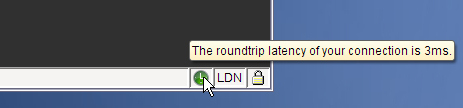
BARX Africa measures client's latency and if it exceeds set tolerances the price will be adjusted accordingly. Latency is displayed on the clock on the bottom right hand corner of the screen, or if in Detached mode on the Quick Deal Panel or Deal Ticket. A green clock represents a 'healthy' low latency with pricing not being affected.
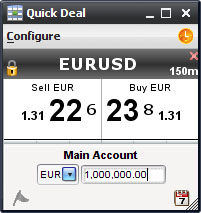
If the clock is orange and pulsing then prices are being delayed and there is a risk of trading on off-market prices:
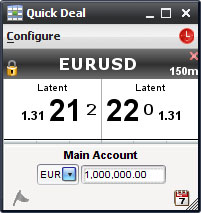
If the clock is red then all prices are latent and trading has been disabled:
You can view your latency status by holding the cursor over the clock. Below are a list of possible causes and solutions, please contact your IT /network team to improve or troubleshoot your latency.
Source |
Possible cause(s) |
Possible Remedies |
User's PC |
• Overworked (too many applications running, or resource-hungry apps) • under spec'ed (e.g. not enough system RAM, non-workstation class computer) • incorrectly configured (e.g. NIC driver settings) |
• User Windows Task Manager to check health of PC and identify root cause(s) • Install BARX Africa onto another PC • Upgrade PC |
LAN |
• network congestion • overworked proxy |
• Use a standalone PC with direct broadband connection to the internet, preferably with another ISP, to prove network congestion/bandwidth/ISP • Connect via a different proxy server • Connect to FOX via Radianz, TNS or Savvis (set-up and monthly costs involved) • Get the client to review SLA agreements with their ISP(s) • Check the health of the internet via: • check bandwidth utilisation - implement bandwidth segregation |
ISP / Internet |
• network congestion • health of internet e.g. virus outbreak, DOS (denial of service) attacks, internet backbone issues |
|
BARX Africa service |
• Barclays Africa related • Loss of internet connectivity |
|